McAfee Will Offer Free Six-Month Subscriptions to Facebook Users - McAfee becomes Facebook's main security service provider - Softpedia:
"Facebook and McAfee announced on January 13, 2009 a partnership through which over 350 million Facebook users will benefit at no cost of a free six-month subscription to McAfee's Internet Security Suite security software. After this six-month period, Facebook users will have the possibility to extend their license at a special discount price.
Besides the free software, Facebook users will benefit from a whole range of new tools built to enhance their and Facebook's security at the same time providing a safer and virus-free environment on the social networking platform.
Users who had their account infected or compromised now have the possibility to employ a new and innovative tool developed by Facebook and McAfee, which will help them re-secure their account. Custom McAfee technology will scan and clean the user's computer before allowing them to log on Facebook again. This tool incorporates McAfee technology and will be provided at no costs for the user.
Facebook has declined to financially capitalize on its users and will provide (alongside McAfee) a series of tutorials and educational materials to help them raise their security knowledge.
McAfee was chosen as the premiere software security provider after Facebook spent serious time on a review process of major security companies. Products like McAfee SiteAdvisor (website rating technology) and McAfee Active Protection (technology for almost instantly blocking known and unknown online threats) have been critical in the reviewing process.
It is unsure whether these products will be included in Facebook's new security measures aimed at detecting and blocking suspicious activities in real-time.
Regarding this topic, Jake Brill, Facebook representative and Project Manager in Facebook's Integrity Team, had this to say, “We invest in dedicated teams and advanced technical systems that detect and block suspicious behavior. When we find a message with a link to a fake login page or other malicious website, we prevent it from being sent and delete all instances of it from the site.” He added that “We also work with third parties to get malicious sites added to browser blacklists or removed completely.”
Users can learn more on this offer by visiting McAfee's Facebook page and clicking on the “Protect Your PC” tab.
Facebook has set up a Security Page for updates and tutorials on issues and topics concerning the site's security."
Showing posts with label Facebook. Show all posts
Showing posts with label Facebook. Show all posts
Monday, January 18, 2010


Wednesday, December 23, 2009
Unhide Friend in FaceBook
In FaceBook
Click on that and it should pop up any hidden friends, ask if you want to add them back to your news feed.
Just hit yes and you should be able to view the feeds from the friends too.
Wednesday, November 18, 2009
10 Solid Tips to Safeguard Your Facebook Privacy
Facebook statistics show that it has 250 million active users each with an average 120 friends. More than 1 billion photos are uploaded every month by its users, over 70% of whom use applications like games and quizzes in Facebook. Unfortunately, most users don’t know the implications of entering personal information, making friends, and playing games on Facebook.1. Organize Friends in Lists
2. Customize Profile Privacy

3. Set Facebook Privacy Level of Photo Albums
4. Restrict Search Visibility
5. Control Automatic Wall Posts and News Feed Updates
6. Set Facebook Wall Privacy
7. Avoid Appearing in Advertisements
8. Protect Yourself from Friends’ Applications
9. Privacy from Your Applications
10. Quitting Facebook? Delete, Don’t Just De-Activate Your Account
This guide will show what you can (and cannot) do to safeguard your Facebook privacy.
1. Organize Friends in Lists
What do you do when your boss, mother-in-law, or a casual web acquaintance sends you a friend request on Facebook? Use Friend Lists. Friend Lists are the foundation of your Facebook privacy settings. Select Friends from the top menu, and use the Create link to create friend lists like Co-workers, Family, College Friends, etc. Your friends can’t see your lists, so you can name them whatever you like.
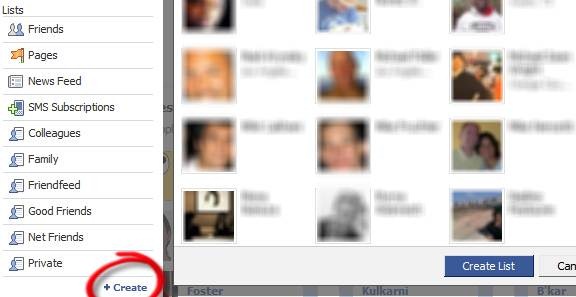
Tip: On your left sidebar, all your friend lists may not show up by default. Click More to see all of them, and drag and drop those you want above the separator.
2. Customize Profile Privacy
Click Settings > Privacy Settings > Profile. Select which parts of your profile will be seen by whom.

If you choose Customize in the drop down, you can be more specific. This is where the Friend Lists you created before become really useful.
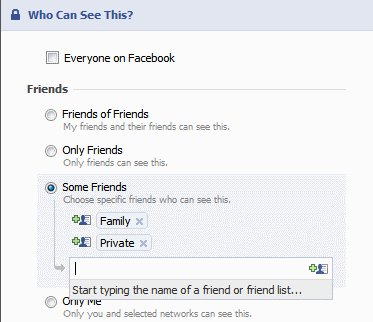
Also go to the Contact Information tab and choose how you want your contact information to be shared on the Internet.
3. Set Facebook Privacy Level of Photo Albums
On the Photos tab of your profile page, click Album Privacy. Here again, you can use your Friend Lists to set the privacy for each photo album.
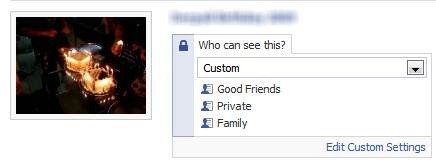
Note that your profile pictures go into a special album that is always visible to ALL your friends.
4. Restrict Search Visibility
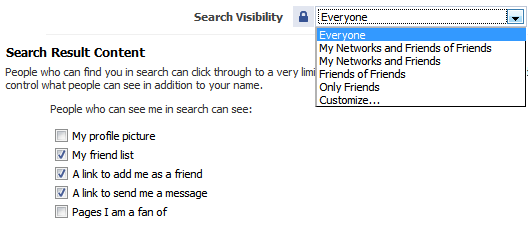
Click Privacy > Search to set your visibility when someone searches Facebook for people. This is an important way to safeguard your Facebook privacy. You can also select what will be visible in the search results.
5. Control Automatic Wall Posts and News Feed Updates
Your actions in Facebook such as comments, likes, appear as highlights on ALL your friends’ home pages. You cannot use friend lists here, only turn them on or off.
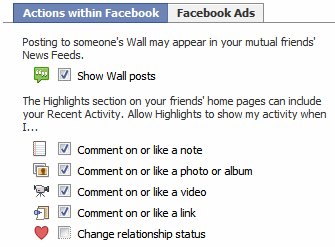
Go to Privacy > News Feed and Wall and choose whether you want your boss or ex-girlfriend to know that you’re in a relationship.
6. Set Facebook Wall Privacy
Go to your profile page, click Options > Settings under the status box.

Here you can control whether your friends can post to your Wall, and who can see the posts made by your friends.
7. Avoid Appearing in Advertisements
Facebook has two types of advertisements: third-party and Facebook. Third-party advertisements are currently not allowed to use your pictures, but there is a setting to disallow it if it is allowed in the future. Go to Privacy > News Feed and Wall > Facebook Ads tab to turn this off.

The Facebook ads shown to your friends are about ‘social actions’ like becoming a fan of something. You can turn this off at the bottom of the page.
8. Protect Yourself from Friends’ Applications
Go to Privacy > Applications, and click the Settings tab and uncheck all the boxes. These settings control what information about you is visible to applications installed by your friends. By default, these are set to visible. This means that your religious, sexual, and political preferences, pictures, etc. are readily available to one of the million worldwide Facebook application developers, each time any of your friends takes a quiz, plays a game, or runs any other Facebook app. This is obviously a Facebook privacy issue.
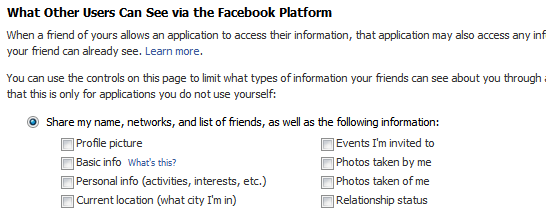
This is the most commonly misunderstood aspect of Facebook privacy. These settings control what applications installed by your friends can see about you, even if you don’t install the application yourself.
Why is this important? Because these settings will not change anything about what you are sharing with the applications you install yourself. For that, go to the next step.
9. Privacy from Your Applications
There is no way to control what applications see about you; it is an all-or-nothing affair. Take this quiz developed by the American Civil Liberties Union to check what anonymous application developers can know about you and your friends each time you take a quiz.
The Burton Group’s Identity Blog features the Facebook Privacy Mirror, an application that you can use to find out what applications know about you and your friends. If you really want to see exactly what profile data of each of your friends is visible to application developers, Privacy Mirror shows it in detail.
The only thing you can do is to authorize only those applications you require and trust. Go to Settings > Application Settings from the top menu. Change the drop-down from Recently Used to Authorized. Here you can see all the applications you have authorized to get access to ALL your profile information. Remove the ones you no longer need.

Also check the list of applications Allowed to Post and Granted Additional Permissions to remove unwanted ones.
10. Quitting Facebook? Delete, Don’t Just De-Activate Your Account
You can easily deactivate your account in Facebook from the Settings page. But deactivation will retain all your profile information within Facebook, including pictures, friends, etc. If you want to permanently delete your Facebook account, click here to submit a deletion request. Note that:
- There is an unspecified delay between submitting your delete request and actual deletion.
- If you login to Facebook, your deletion request is automatically cancelled.
- There doesn’t seem to be any way to confirm that your request was completed.
- Even after permanent deletion, Facebook says that copies of your photos may remain on their servers for technical reasons.
Also, note that once in a while, there is news of a Facebook hack or leak that can expose your information on the Internet. It is better to be safe than sorry by avoiding using Facebook for anything that may embarrass you.
I hope this article gives you a better understanding and insight into Facebook’s privacy.
Monday, November 9, 2009
Major Security Hole Discovered on Facebook and MySpace - The oversight allowed account hijacking and theft of user data - Softpedia
Major Security Hole Discovered on Facebook and MySpace - The oversight allowed account hijacking and theft of user data - Softpedia: "A Web developer has documented a proof-of-concept attack that could have been used to hijack accounts and steal private information on Facebook and MySpace. The attack leveraged a serious security oversight in XML configuration files used to define the cross-domain access policy for Flash applications.
The discovery was made while 24-years-old Dutch Web developer Yvo Schaap tried to find a workaround to a problem he was having with one of his Facebook applications. “I found a solution to one of my function limitations. Surprisingly, when looked into more carefully my solution allowed full access and control to the Facebook user account that accessed my application,” he notes on his blog.
As the programmer goes on to explain, this is not actually a bug, but an insecure configuration issue in crossdomain.xml. This file can be used to tell a Flash application, loaded from a URL and executed locally on the client, if it is able to access a file served from its domain. For example, if the owner of domain A wants to let an application from domain B access its files, it can specify domain B in the crossdomain.xml on its server.
While the crossdomain.xml on facebook.com whitelisted only other domains and sub-domains associated with Facebooks, the similar file on connect.facebook.com contained an <allow-access-from domain=”*” /> directive. This meant that any Flash application, hosted on any domain, was allowed to access data on the connect.facebook.com sub-domain.
“This wouldn't be a big deal if the subdomain only hosts images, but unfortunately this domain hosts the whole Facebook property, including a facebook user session,” Mr. Schaap notes. The web developer goes on to point out that if a user has auto-login enabled and is served with the URL to a specially-crafted flash file, an attacker could obtain full control of their account.
MySpace also suffered from a similar crossdomain.xml misconfiguration, though not as obvious as in Facebook's case. In particular, the crossdomain.xml on myspace.com granted access to a farm.sproutbuilder.com sub-domain. Sprout Builder is a web application building platform, which amongst other types of media, allows its clients to upload and incorporate .swf (Flash) files into their projects. As it turns out, these files are hosted on farm.sproutbuilder.com, thus opening the opportunity to create MySpace self-propagating social networking worm.
Yvo Schaap contacted both companies in advance of making this public and they moved swiftly to address the security problems. However, if two of the biggest social networking platforms left such gaping security holes opened, it is reasonable to assume that many smaller websites also have them."
Source: http://news.softpedia.com/news/Major-Security-Hole-Discovered-on-Facebook-and-MySpace-126327.shtml
The discovery was made while 24-years-old Dutch Web developer Yvo Schaap tried to find a workaround to a problem he was having with one of his Facebook applications. “I found a solution to one of my function limitations. Surprisingly, when looked into more carefully my solution allowed full access and control to the Facebook user account that accessed my application,” he notes on his blog.
As the programmer goes on to explain, this is not actually a bug, but an insecure configuration issue in crossdomain.xml. This file can be used to tell a Flash application, loaded from a URL and executed locally on the client, if it is able to access a file served from its domain. For example, if the owner of domain A wants to let an application from domain B access its files, it can specify domain B in the crossdomain.xml on its server.
While the crossdomain.xml on facebook.com whitelisted only other domains and sub-domains associated with Facebooks, the similar file on connect.facebook.com contained an <allow-access-from domain=”*” /> directive. This meant that any Flash application, hosted on any domain, was allowed to access data on the connect.facebook.com sub-domain.
“This wouldn't be a big deal if the subdomain only hosts images, but unfortunately this domain hosts the whole Facebook property, including a facebook user session,” Mr. Schaap notes. The web developer goes on to point out that if a user has auto-login enabled and is served with the URL to a specially-crafted flash file, an attacker could obtain full control of their account.
MySpace also suffered from a similar crossdomain.xml misconfiguration, though not as obvious as in Facebook's case. In particular, the crossdomain.xml on myspace.com granted access to a farm.sproutbuilder.com sub-domain. Sprout Builder is a web application building platform, which amongst other types of media, allows its clients to upload and incorporate .swf (Flash) files into their projects. As it turns out, these files are hosted on farm.sproutbuilder.com, thus opening the opportunity to create MySpace self-propagating social networking worm.
Yvo Schaap contacted both companies in advance of making this public and they moved swiftly to address the security problems. However, if two of the biggest social networking platforms left such gaping security holes opened, it is reasonable to assume that many smaller websites also have them."
Source: http://news.softpedia.com/news/Major-Security-Hole-Discovered-on-Facebook-and-MySpace-126327.shtml
Subscribe to:
Posts (Atom)